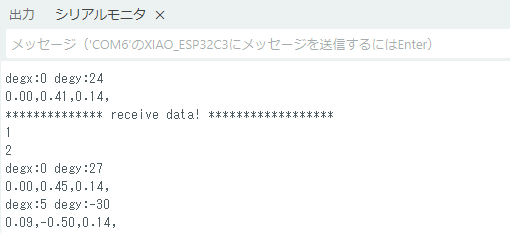
「BLEモジュールのスキャンプログラム作成」で作成したスキャンプログラムに、writeとnotifyの機能を追加し、ペリフェラルとして作成したXIAO ESP32C3と通信します。
- Android携帯:SH-52E Android14(API34) bleバージョン5.3
- BLEモジュール:XIAO ESP32C3 bleバージョン5.0
- Android開発環境:Android Studio Otter 2 Feature Drop | 2025.2.2
BLEモジュールの通信プログラムの作成
ペリフェラルとして作成したXIAO ESP32C3との接続およびデータ通信のために、次のような通信プログラムを作成します。
Manifest.xmlは、「BLEモジュールのスキャンプログラム作成」で作成したコードとなります。
- Notify を有効にするために、mGatt.setCharacteristicNotification と CCCD(0x2902)へ書き込みます。
- BLE GATT 操作は非同期のため、 onCharacteristicWrite / onCharacteristicChanged や Descriptor 書き込みのコールバックを使用します。
- Android 12+ では、 BLUETOOTH_CONNECT の権限がないと、 connectGatt/characteristic 操作が SecurityException を投げることがあるため、実行前にチェックします。
BleEsp32\app\src\main\java\com\tomosoft\BleEsp32\MainActivity.java
package com.tomosoft.BleEsp32;

import android.os.Bundle;

import androidx.activity.EdgeToEdge;
import androidx.appcompat.app.AppCompatActivity;
import androidx.core.graphics.Insets;
import androidx.core.view.ViewCompat;
import androidx.core.view.WindowInsetsCompat;
import androidx.core.app.ActivityCompat;


import android.Manifest;
import android.app.Activity;
import android.bluetooth.BluetoothAdapter;
import android.bluetooth.BluetoothDevice;
import android.bluetooth.BluetoothGatt;
import android.bluetooth.BluetoothGattCallback;
import android.bluetooth.BluetoothGattCharacteristic;
import android.bluetooth.BluetoothGattDescriptor;
import android.bluetooth.BluetoothGattService;
import android.bluetooth.BluetoothManager;
import android.bluetooth.le.BluetoothLeScanner;
import android.bluetooth.le.ScanCallback;
import android.bluetooth.le.ScanResult;
import android.content.Context;
import android.content.Intent;
import android.content.pm.PackageManager;
import android.os.Build;
import android.text.TextUtils;
import android.widget.ArrayAdapter;
import android.widget.Button;
import android.widget.EditText;
import android.widget.ListView;
import android.widget.TextView;

import androidx.activity.result.ActivityResultLauncher;
import androidx.activity.result.contract.ActivityResultContracts;
import androidx.annotation.NonNull;
import androidx.core.content.ContextCompat;

import java.nio.charset.StandardCharsets;
import java.util.ArrayList;
import java.util.List;
import java.util.UUID;

public class MainActivity extends AppCompatActivity {

    private BluetoothAdapter bluetoothAdapter;
    private BluetoothLeScanner bleScanner;
    private final List<String> devices = new ArrayList<>();
    private final List<BluetoothDevice> deviceObjs = new ArrayList<>();
    private ArrayAdapter<String> adapter;

    private BluetoothGatt mGatt;
    private BluetoothGattCharacteristic targetChar;
    private boolean notifyEnabled = false;

    private TextView tvStatus;
    private TextView tvLog;
    private EditText etServiceUuid, etCharUuid, etWriteValue;
    private Button btnWrite, btnToggleNotify;

    private static final UUID CCCD_UUID = UUID.fromString("00002902-0000-1000-8000-00805f9b34fb");

    // Bluetooth 有効化用
    private ActivityResultLauncher<Intent> enableBtLauncher;


    //// ////////////
    private ActivityResultLauncher<Intent> enableBtIntent;

    private final ScanCallback scanCallback = new ScanCallback() {
        @Override
        public void onScanResult(int callbackType, ScanResult result) {
            runOnUiThread(() -> {
                String addr = result.getDevice().getAddress();
                if (ActivityCompat.checkSelfPermission(MainActivity.this, Manifest.permission.BLUETOOTH_CONNECT) != PackageManager.PERMISSION_GRANTED) {
                    // TODO: Consider calling
                    //    ActivityCompat#requestPermissions
                    // here to request the missing permissions, and then overriding
                    //   public void onRequestPermissionsResult(int requestCode, String[] permissions,
                    //                                          int[] grantResults)
                    // to handle the case where the user grants the permission. See the documentation
                    // for ActivityCompat#requestPermissions for more details.
                    return;
                }
                String name = result.getDevice().getName();
                String line = addr + " / " + (name != null ? name : "N/A") + " / RSSI:" + result.getRssi();
                if (!devices.contains(line)) {
                    devices.add(0, line);
                    deviceObjs.add(0, result.getDevice());
                    adapter.notifyDataSetChanged();
                }
            });
        }
    };
    private final String[] REQUIRED_PERMISSIONS_API31 = new String[]{
            Manifest.permission.BLUETOOTH_SCAN,
            Manifest.permission.BLUETOOTH_CONNECT
    };

    private final ActivityResultLauncher<String[]> requestPermissionLauncher =
            registerForActivityResult(new ActivityResultContracts.RequestMultiplePermissions(), result -> {
                boolean granted = true;
                for (Boolean b : result.values()) {
                    if (b == null || !b) { granted = false; break; }
                }
                if (granted) {
                    startBleScan();
                } else {
                    tvStatus.setText("Permissions denied");
                }
            });


    @Override
    protected void onCreate(Bundle savedInstanceState) {
        super.onCreate(savedInstanceState);
        EdgeToEdge.enable(this);
        setContentView(R.layout.activity_main);
        ViewCompat.setOnApplyWindowInsetsListener(findViewById(R.id.root), (v, insets) -> {
            Insets systemBars = insets.getInsets(WindowInsetsCompat.Type.systemBars());
            v.setPadding(systemBars.left, systemBars.top, systemBars.right, systemBars.bottom);
            return insets;
        });
    ///////////////////
        Button btnStart = findViewById(R.id.btnStart);
        Button btnStop = findViewById(R.id.btnStop);
        tvStatus = findViewById(R.id.tvStatus);
        tvLog = findViewById(R.id.tvLog);
        ListView listView = findViewById(R.id.listView);
        etServiceUuid = findViewById(R.id.etServiceUuid);
        etCharUuid = findViewById(R.id.etCharUuid);
        etWriteValue = findViewById(R.id.etWriteValue);
        btnWrite = findViewById(R.id.btnWrite);
        btnToggleNotify = findViewById(R.id.btnToggleNotify);

        adapter = new ArrayAdapter<>(this, android.R.layout.simple_list_item_1, devices);
        listView.setAdapter(adapter);

        BluetoothManager manager = (BluetoothManager) getSystemService(Context.BLUETOOTH_SERVICE);
        bluetoothAdapter = manager.getAdapter();

        enableBtLauncher = registerForActivityResult(
                new ActivityResultContracts.StartActivityForResult(),
                result -> {
                    if (result.getResultCode() == Activity.RESULT_OK) {
                        appendLog("Bluetooth enabled");
                        prepareAndStartScan();
                    } else {
                        appendLog("Bluetooth not enabled");
                    }
                });

        btnStart.setOnClickListener(v -> prepareAndStartScan());
        btnStop.setOnClickListener(v -> stopBleScan());

        listView.setOnItemClickListener((parent, view, position, id) -> {
            BluetoothDevice device = deviceObjs.get(position);
            appendLog("Selected device: " + device.getAddress());
            connectToDevice(device);
        });

        btnWrite.setOnClickListener(v -> {
            if (targetChar == null) {
                appendLog("No characteristic selected");
                return;
            }
            String input = etWriteValue.getText().toString();
            if (TextUtils.isEmpty(input)) {
                appendLog("Write value empty");
                return;
            }
            byte[] data = parseInputToBytes(input);
            writeCharacteristic(data);
        });

        btnToggleNotify.setOnClickListener(v -> {
            if (targetChar == null) {
                appendLog("No characteristic selected");
                return;
            }
            setNotify(!notifyEnabled);
        });
    }

    private void prepareAndStartScan() {
        if (bluetoothAdapter == null) {
            tvStatus.setText("Bluetooth not supported");
            return;
        }
        if (!bluetoothAdapter.isEnabled()) {
            // リクエストして Bluetooth を有効化
            Intent enableBtIntent = new Intent(BluetoothAdapter.ACTION_REQUEST_ENABLE);
            this.enableBtIntent.launch(enableBtIntent);
            return;
        }
        // Android 12+ の権限チェック
        if (Build.VERSION.SDK_INT >= Build.VERSION_CODES.S) {
            boolean scanGranted = ContextCompat.checkSelfPermission(this, Manifest.permission.BLUETOOTH_SCAN) == PackageManager.PERMISSION_GRANTED;
            boolean connectGranted = ContextCompat.checkSelfPermission(this, Manifest.permission.BLUETOOTH_CONNECT) == PackageManager.PERMISSION_GRANTED;
            if (!scanGranted || !connectGranted) {
                requestPermissionLauncher.launch(REQUIRED_PERMISSIONS_API31);
                return;
            }
        } else {
            // Android 6〜11 の場合は LOCATION 権限が必要なことがある(スキャンで位置情報を推測できるため)
            if (ContextCompat.checkSelfPermission(this, Manifest.permission.ACCESS_FINE_LOCATION) != PackageManager.PERMISSION_GRANTED) {
                ActivityCompat.requestPermissions(this, new String[]{Manifest.permission.ACCESS_FINE_LOCATION}, 1001);
                return;
            }
        }
        startBleScan();
    }

    private void startBleScan() {
        if (bluetoothAdapter == null || !bluetoothAdapter.isEnabled()) {
            tvStatus.setText("Bluetooth disabled");
            return;
        }
        // BluetoothLeScanner の取得(CONNECT 権限が必要な操作もある)
        bleScanner = bluetoothAdapter.getBluetoothLeScanner();
        if (bleScanner == null) {
            tvStatus.setText("BLE scanner not available");
            return;
        }
        devices.clear();
        deviceObjs.clear();
        adapter.notifyDataSetChanged();
        // 権限チェック(安全のため)
        if (Build.VERSION.SDK_INT >= Build.VERSION_CODES.S &&
                ContextCompat.checkSelfPermission(this, Manifest.permission.BLUETOOTH_SCAN) != PackageManager.PERMISSION_GRANTED) {
            tvStatus.setText("BLUETOOTH_SCAN missing");
            return;
        }
        bleScanner.startScan(scanCallback);
        tvStatus.setText("Scanning...");
        appendLog("Scan started");
    }

    private void stopBleScan() {
        if (bleScanner != null) {
            // 権限チェック
            if (Build.VERSION.SDK_INT >= Build.VERSION_CODES.S &&
                    ContextCompat.checkSelfPermission(this, Manifest.permission.BLUETOOTH_CONNECT) != PackageManager.PERMISSION_GRANTED) {
                tvStatus.setText("BLUETOOTH_CONNECT missing");
                return;
            }
            try {
                bleScanner.stopScan(scanCallback);
                appendLog("Scan stopped");
            } catch (Exception e) {
                // まれに例外が出ることがあるのでキャッチ
                e.printStackTrace();
            }
            tvStatus.setText("Stopped");
        }
    }

    private void connectToDevice(@NonNull BluetoothDevice device) {
        // Permission check for connectGatt
        if (Build.VERSION.SDK_INT >= Build.VERSION_CODES.S &&
                ContextCompat.checkSelfPermission(this, Manifest.permission.BLUETOOTH_CONNECT) != PackageManager.PERMISSION_GRANTED) {
            appendLog("BLUETOOTH_CONNECT permission missing. Cannot connect.");
            return;
        }
        appendLog("Connecting to " + device.getAddress());
        // 古い API を使う単純な実装
        if (mGatt != null) {
            mGatt.close();
            mGatt = null;
        }
        mGatt = device.connectGatt(this, false, gattCallback);
        tvStatus.setText("Connecting...");
    }

    private final BluetoothGattCallback gattCallback = new BluetoothGattCallback() {
        @Override
        public void onConnectionStateChange(@NonNull BluetoothGatt gatt, int status, int newState) {
            super.onConnectionStateChange(gatt, status, newState);
            if (status != BluetoothGatt.GATT_SUCCESS) {
                appendLog("Connection state change error: " + status);
            }
            if (newState == android.bluetooth.BluetoothProfile.STATE_CONNECTED) {
                appendLog("Connected, discovering services...");
                runOnUiThread(() -> tvStatus.setText("Connected"));
                if (ActivityCompat.checkSelfPermission(MainActivity.this, Manifest.permission.BLUETOOTH_CONNECT) != PackageManager.PERMISSION_GRANTED) {
                    // TODO: Consider calling
                    //    ActivityCompat#requestPermissions
                    // here to request the missing permissions, and then overriding
                    //   public void onRequestPermissionsResult(int requestCode, String[] permissions,
                    //                                          int[] grantResults)
                    // to handle the case where the user grants the permission. See the documentation
                    // for ActivityCompat#requestPermissions for more details.
                    return;
                }
                boolean ok = gatt.discoverServices();
                appendLog("discoverServices called: " + ok);
            } else if (newState == android.bluetooth.BluetoothProfile.STATE_DISCONNECTED) {
                appendLog("Disconnected");
                runOnUiThread(() -> {
                    tvStatus.setText("Disconnected");
                    targetChar = null;
                    notifyEnabled = false;
                    btnToggleNotify.setText("Enable Notify");
                });
            }
        }

        @Override
        public void onServicesDiscovered(@NonNull BluetoothGatt gatt, int status) {
            super.onServicesDiscovered(gatt, status);
            appendLog("Services discovered: status=" + status);
            // サービス/キャラ探索ロジック
            BluetoothGattService service = null;
            BluetoothGattCharacteristic chr = null;

            String svcInput = etServiceUuid.getText().toString().trim();
            String chrInput = etCharUuid.getText().toString().trim();
            if (!svcInput.isEmpty()) {
                try {
                    UUID svcUuid = UUID.fromString(svcInput);
                    service = gatt.getService(svcUuid);
                } catch (IllegalArgumentException e) {
                    appendLog("Invalid service UUID format");
                }
            }
            if (service != null && !chrInput.isEmpty()) {
                try {
                    UUID chrUuid = UUID.fromString(chrInput);
                    chr = service.getCharacteristic(chrUuid);
                } catch (IllegalArgumentException e) {
                    appendLog("Invalid characteristic UUID format");
                }
            }

            // 指定がない場合は探索して最初の書き込み可能 or notify 可能なキャラクタリスティックを選ぶ
            if (chr == null) {
                // try all services
                for (BluetoothGattService s : gatt.getServices()) {
                    for (BluetoothGattCharacteristic c : s.getCharacteristics()) {
                        final int props = c.getProperties();
                        if ((props & BluetoothGattCharacteristic.PROPERTY_WRITE) != 0
                                || (props & BluetoothGattCharacteristic.PROPERTY_WRITE_NO_RESPONSE) != 0
                                || (props & BluetoothGattCharacteristic.PROPERTY_NOTIFY) != 0
                                || (props & BluetoothGattCharacteristic.PROPERTY_INDICATE) != 0) {
                            chr = c;
                            service = s;
                            break;
                        }
                    }
                    if (chr != null) break;
                }
            }

            if (chr != null) {
                targetChar = chr;
                appendLog("Selected characteristic: " + chr.getUuid());
                runOnUiThread(() -> {
                    tvStatus.setText("Service/Char ready");
                });
            } else {
                appendLog("No suitable characteristic found");
            }
        }

        @Override
        public void onCharacteristicWrite(@NonNull BluetoothGatt gatt, @NonNull BluetoothGattCharacteristic characteristic, int status) {
            super.onCharacteristicWrite(gatt, characteristic, status);
            appendLog("Characteristic write callback: status=" + status + " uuid=" + characteristic.getUuid());
        }

        @Override
        public void onCharacteristicChanged(@NonNull BluetoothGatt gatt, @NonNull BluetoothGattCharacteristic characteristic) {
            super.onCharacteristicChanged(gatt, characteristic);
            byte[] val = characteristic.getValue();
            //appendLog("Notification from " + characteristic.getUuid() + " : " + bytesToHexOrText(val));
            appendLog("Notification from " + characteristic.getUuid() + " : " + new String(val, StandardCharsets.US_ASCII));
        }
    };

    private void writeCharacteristic(byte[] data) {
        if (mGatt == null || targetChar == null) {
            appendLog("Not connected or no characteristic");
            return;
        }
        if (Build.VERSION.SDK_INT >= Build.VERSION_CODES.S &&
                ContextCompat.checkSelfPermission(this, Manifest.permission.BLUETOOTH_CONNECT) != PackageManager.PERMISSION_GRANTED) {
            appendLog("BLUETOOTH_CONNECT missing for write");
            return;
        }
        targetChar.setValue(data);
        boolean success = mGatt.writeCharacteristic(targetChar);
        appendLog("writeCharacteristic called: " + success);
    }

    private void setNotify(boolean enable) {
        if (mGatt == null || targetChar == null) {
            appendLog("Not connected or no characteristic");
            return;
        }
        if (Build.VERSION.SDK_INT >= Build.VERSION_CODES.S &&
                ContextCompat.checkSelfPermission(this, Manifest.permission.BLUETOOTH_CONNECT) != PackageManager.PERMISSION_GRANTED) {
            appendLog("BLUETOOTH_CONNECT missing for notify");
            return;
        }
        boolean localSet = mGatt.setCharacteristicNotification(targetChar, enable);
        appendLog("setCharacteristicNotification(local) returned: " + localSet);
        // Descriptor を書き込む必要あり (0x2902)
        BluetoothGattDescriptor descriptor = targetChar.getDescriptor(CCCD_UUID);
        if (descriptor != null) {
            descriptor.setValue(enable ? BluetoothGattDescriptor.ENABLE_NOTIFICATION_VALUE : BluetoothGattDescriptor.DISABLE_NOTIFICATION_VALUE);
            boolean wrote = mGatt.writeDescriptor(descriptor);
            appendLog("writeDescriptor called: " + wrote);
        } else {
            appendLog("CCCD descriptor not found on characteristic");
        }
        notifyEnabled = enable;
        runOnUiThread(() -> btnToggleNotify.setText(enable ? "Disable Notify" : "Enable Notify"));
    }

    private byte[] parseInputToBytes(String in) {
        in = in.trim();
        // hex-like: contains spaces or hex digits and no letters beyond A-F and spaces
        if (in.matches("(?i)^[0-9a-f ]+$")) {
            String[] parts = in.split("\\s+");
            byte[] out = new byte[parts.length];
            for (int i = 0; i < parts.length; i++) {
                out[i] = (byte) Integer.parseInt(parts[i], 16);
            }
            return out;
        } else {
            return in.getBytes(StandardCharsets.UTF_8);
        }
    }

    private String bytesToHexOrText(byte[] b) {
        if (b == null || b.length == 0) return "<empty>";
        // try to display both
        StringBuilder hex = new StringBuilder();
        boolean ascii = true;
        for (byte by : b) {
            hex.append(String.format("%02X ", by));
            if (by < 0x20 || by > 0x7E) ascii = false;
        }
        String txt = ascii ? new String(b, StandardCharsets.UTF_8) : "<non-ascii>";
        return hex.toString().trim() + " / " + txt;
    }

    private void appendLog(final String line) {
        runOnUiThread(() -> {
            tvLog.append(line + "\n");
        });
    }

    @Override
    protected void onPause() {
        super.onPause();
        stopBleScan();
        if (mGatt != null) {
            if (ActivityCompat.checkSelfPermission(this, Manifest.permission.BLUETOOTH_CONNECT) != PackageManager.PERMISSION_GRANTED) {
                // TODO: Consider calling
                //    ActivityCompat#requestPermissions
                // here to request the missing permissions, and then overriding
                //   public void onRequestPermissionsResult(int requestCode, String[] permissions,
                //                                          int[] grantResults)
                // to handle the case where the user grants the permission. See the documentation
                // for ActivityCompat#requestPermissions for more details.
                return;
            }
            mGatt.close();
            mGatt = null;
        }
    }
}
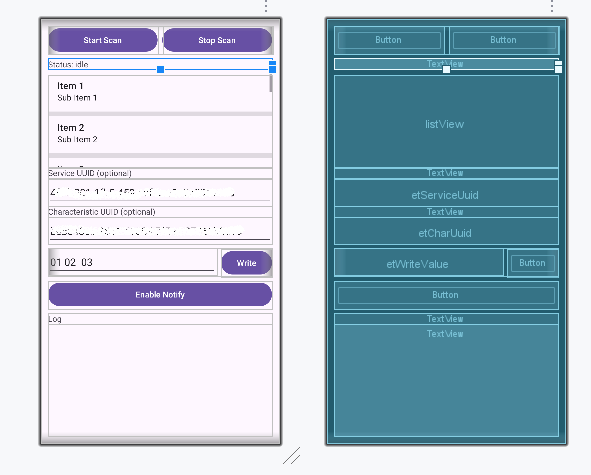
次の画面レイアウトを使用します。
BLEモジュールの通信プログラムの実行
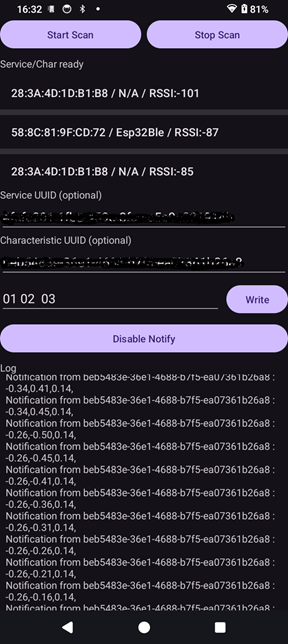
作成した通信プログラムを携帯にダウンロードして実行すると、次のような内容が画面に表示されます。
Android携帯画面の「Write」ボタンを押すと、XIAO ESP32C3のシリアルモニタには次のメッセージが表示されます。