
Freenove ESP32-S3-WROOM CAMボードのカメラを使って、MJPEG(Motion JPEG)によりブラウザ上で表示を更新します。
HTTP上でMotionJPEGの配信
multipart/x-mixed-replaceというのは、Netscape社が提唱した、サーバからのプッシュ配信の為のもので、クライアント側は、新たなpartが送られてきたら、表示中のものを破棄して新しいPartを表示する、という仕様になっています。
各JPEG画像の区切りの判断は、通常のmultipart同様、Content-Typeに記載したboundary文字列で判断します。イメージとして、いくつか省略していますが、最初に2行がレスポンスヘッダで、その後に–myboundaryから始まる各文章(ブロック)がJPEG画像一枚一枚に対応します。
HTTP/1.1 200 OK
content-type: multipart/x-mixed-replace; boundary=myboundary

--myboundary
Content-Length:74429
Content-Type:image/jpeg

(JPEG画像)

--myboundary
Content-Length:74429
Content-Type:image/jpeg

(JPEG画像)
このContentTypeが処理できるブラウザは、ChromeとFireFoxで、IEとEdgeでは処理できません。※AndroidのChromeでも処理できました。
MJPEGスケッチの作成
MJPEGスケッチ「esp32s3_mjpeg.ino」を作成します。
esp32s3_mjpeg.ino
/**********************************************************************
  Filename    : Camera and SDcard
  Description : Use the onboard buttons to take photo and save them to an SD card.
  Auther      : www.freenove.com
  Modification: 2022/11/02
**********************************************************************/
#include "esp_camera.h"
#define CAMERA_MODEL_ESP32S3_EYE
#include "camera_pins.h"
#include "ws2812.h"
#include "sd_read_write.h"
//*************
#include <Arduino.h>
#include <WiFi.h>
#include <WebServer.h>

#define BUTTON_PIN 0
//*************
const char* ssid = "xxxxx";     // 各自のWifi環境のSSIDを指定する
const char* password = "xxxxxx";  // 各自のWifi環境のPasswordを指定する

// Webサーバーのインスタンスを作成
WebServer server(80);  // ポート番号は80を使用

hw_timer_t* timer = NULL;
uint64_t time_ms;
uint64_t current_time;

// MJPEGストリームのヘッダ
const char* STREAM_HEADER =
  "HTTP/1.1 200 OK\r\n"
  "Content-Type: multipart/x-mixed-replace; boundary=frame\r\n"
  "\r\n";

// JPEGフレームのヘッダ
const char* FRAME_HEADER =
  "--frame\r\n"
  "Content-Type: image/jpeg\r\n"
  "Content-Length: %d\r\n"
  "\r\n";

// ルートエンドポイント
const char* root_html = R"rawliteral(
  <p>It might take more than 5 seconds to capture a photo.</p>
  <div><img src="stream" ></div>
  )rawliteral";


// JPEGストリームハンドル
int count = 0;
void handleJPGStream() {
  WiFiClient client = server.client();
  if (!client.connected()) {
    Serial.println("Client disconnected");
    return;
  }

  camera_fb_t* fb = NULL;

  // MJPEGストリームのヘッダーを送信
  current_time = timerReadMillis(timer);
  client.print(STREAM_HEADER);
  time_ms = timerReadMillis(timer) - current_time;
  Serial.print("TSTREAM_HEADER (ms): ");
  Serial.println(time_ms);

  while (client.connected()) {
    //    Serial.println(count);
    count = count + 1;
    // カメラのフレームをキャプチャ
    current_time = timerReadMillis(timer);
    fb = esp_camera_fb_get();
    if (!fb) {
      Serial.println("Camera capture failed");
      return;
    }
    time_ms = timerReadMillis(timer) - current_time;
    Serial.print("sp_camera_fb_get (ms): ");
    Serial.println(time_ms);

    // JPEGフレームのヘッダーを送信
    current_time = timerReadMillis(timer);
    client.printf(FRAME_HEADER, fb->len);
    client.write(fb->buf, fb->len);  // JPEGデータを送信
    time_ms = timerReadMillis(timer) - current_time;
    Serial.print("FRAME_HEADER+write (ms): ");
    Serial.println(time_ms);

    // フレームバッファを開放
    current_time = timerReadMillis(timer);
    esp_camera_fb_return(fb);
    time_ms = timerReadMillis(timer) - current_time;
    Serial.print("esp_camera_fb_return (ms): ");
    Serial.println(time_ms);

    // 10 FPS: delay(100)
    // 20 FPS: delay(50)
    // 30 FPS: delay(33)
    //    delay(33);  // 次のフレームまで待機(FPS調整)
    ws2812SetColor(count & 3);
  }
}


void setup() {
  Serial.begin(115200);
  Serial.setDebugOutput(false);
  Serial.println();
  pinMode(BUTTON_PIN, INPUT_PULLUP);
  ws2812Init();
  sdmmcInit();
  //removeDir(SD_MMC, "/camera");
  createDir(SD_MMC, "/camera");
  listDir(SD_MMC, "/camera", 0);
  if (cameraSetup() == 1) {
    ws2812SetColor(2);
  } else {
    ws2812SetColor(1);
    return;
  }

  //***********************************
  Serial.setDebugOutput(true);

  // PSRAMのサイズを確認
  if (ESP.getPsramSize()) {
    Serial.println("PSRAM is present.");
    Serial.print("PSRAM size: ");
    Serial.println(ESP.getPsramSize());
  } else {
    Serial.println("PSRAM is not present.");
  }

  // Wi-Fi接続
  WiFi.begin(ssid, password);
  while (WiFi.status() != WL_CONNECTED) {
    delay(1000);
    Serial.println("Connecting to WiFi...");
  }
  Serial.println("Connected to WiFi");
  Serial.print("IP Address: ");
  Serial.println(WiFi.localIP());  // IPアドレスを表示

  // ルートエンドポイントでホームページを表示
  server.on("/", HTTP_GET, []() {
    server.send(200, "text/html", root_html);
  });

  // /stream エンドポイントで映像をストリーム
  server.on("/stream", HTTP_GET, handleJPGStream);

  // サーバーを開始
  server.begin();
  Serial.println("Web server started!");

  timer = timerBegin(1000000);  // タイマーハンドルを取得
}

void loop() {
  if (digitalRead(BUTTON_PIN) == LOW) {
    delay(20);
    if (digitalRead(BUTTON_PIN) == LOW) {
      ws2812SetColor(3);
      while (digitalRead(BUTTON_PIN) == LOW)
        ;
      camera_fb_t* fb = NULL;
      fb = esp_camera_fb_get();
      if (fb != NULL) {
        int photo_index = readFileNum(SD_MMC, "/camera");
        if (photo_index != -1) {
          String path = "/camera/" + String(photo_index) + ".jpg";
          writejpg(SD_MMC, path.c_str(), fb->buf, fb->len);
        }
        esp_camera_fb_return(fb);
      } else {
        Serial.println("Camera capture failed.");
      }
      ws2812SetColor(2);
    }
  }
  //*******************************
  server.handleClient();
}

int cameraSetup(void) {
  camera_config_t config;
  config.ledc_channel = LEDC_CHANNEL_0;
  config.ledc_timer = LEDC_TIMER_0;
  config.pin_d0 = Y2_GPIO_NUM;
  config.pin_d1 = Y3_GPIO_NUM;
  config.pin_d2 = Y4_GPIO_NUM;
  config.pin_d3 = Y5_GPIO_NUM;
  config.pin_d4 = Y6_GPIO_NUM;
  config.pin_d5 = Y7_GPIO_NUM;
  config.pin_d6 = Y8_GPIO_NUM;
  config.pin_d7 = Y9_GPIO_NUM;
  config.pin_xclk = XCLK_GPIO_NUM;
  config.pin_pclk = PCLK_GPIO_NUM;
  config.pin_vsync = VSYNC_GPIO_NUM;
  config.pin_href = HREF_GPIO_NUM;
  config.pin_sccb_sda = SIOD_GPIO_NUM;
  config.pin_sccb_scl = SIOC_GPIO_NUM;
  config.pin_pwdn = PWDN_GPIO_NUM;
  config.pin_reset = RESET_GPIO_NUM;
  config.xclk_freq_hz = 10000000;
  config.frame_size = FRAMESIZE_VGA;
  config.pixel_format = PIXFORMAT_JPEG;  // for streaming
  config.grab_mode = CAMERA_GRAB_WHEN_EMPTY;
  config.fb_location = CAMERA_FB_IN_PSRAM;
  config.jpeg_quality = 12;
  config.fb_count = 1;

  // if PSRAM IC present, init with UXGA resolution and higher JPEG quality
  // for larger pre-allocated frame buffer.
  if (psramFound()) {
    config.jpeg_quality = 10;
    config.fb_count = 2;
    config.grab_mode = CAMERA_GRAB_LATEST;
  } else {
    // Limit the frame size when PSRAM is not available
    config.frame_size = FRAMESIZE_SVGA;
    config.fb_location = CAMERA_FB_IN_DRAM;
  }

  // camera init
  esp_err_t err = esp_camera_init(&config);
  if (err != ESP_OK) {
    Serial.printf("Camera init failed with error 0x%x", err);
    return 0;
  }

  sensor_t* s = esp_camera_sensor_get();
  // initial sensors are flipped vertically and colors are a bit saturated
  s->set_vflip(s, 1);       // flip it back
  s->set_brightness(s, 1);  // up the brightness just a bit
  s->set_saturation(s, 0);  // lower the saturation

  Serial.println("Camera configuration complete!");
  return 1;
}
MJPEGスケッチの実行
作成したMJPEGスケッチ「esp32s3_mjpeg.ino」を実行します。パソコンのブラウザから「http://192.168.xxx.xxx/」にアクセスします。シリアルモニタに次のように時刻が表示されます。表示更新間隔がばらついていることが分かります。
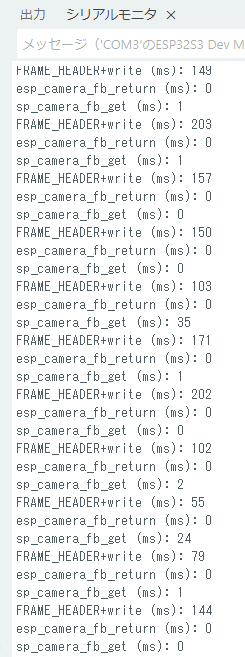
撮影されている動画の時計の針の動きにばらつきがあり、1秒以下で更新されていない場合もあることが分かります。