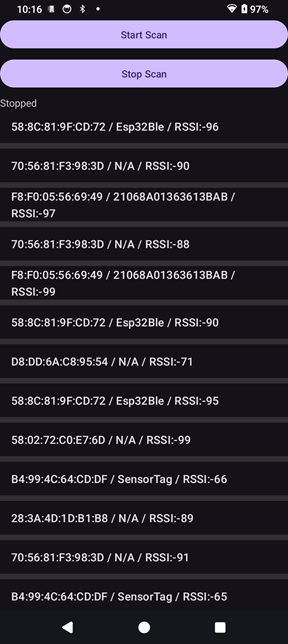
BLEモジュールのスキャンプログラムを作成します。
- Android携帯:SH-52E Android14(API34) bleバージョン5.3
- BLEモジュール:XIAO ESP32C3 bleバージョン5.0
- BLEモジュール:CC2541 SensorTag bleバージョン4.0
- Android開発環境:Android Studio Otter 2 Feature Drop | 2025.2.2
BLEモジュールのスキャンプログラムの作成
「Android携帯を使ってCC2541 SensorTagとの通信」の「Android携帯を使ってBLEモジュールのスキャン(その2)」で作成しました。
今回は、javaコードを見直し、Android Studio Otter 2で開発します。
- Android 12 以上(API 31+)では BLUETOOTH_SCAN / BLUETOOTH_CONNECT を実行時に要求する必要があります(。
- Manifest の BLUETOOTH_SCAN に android:usesPermissionFlags=”neverForLocation” を付けています。これはアプリが位置情報目的でスキャンを使用しない場合に、位置情報権限を不要にするために使います。
BleScan2\app\src\main\AndroidManifest.xml
<?xml version="1.0" encoding="utf-8"?>
<manifest xmlns:android="http://schemas.android.com/apk/res/android"
    package="com.tomosoft.BleScan2">
    <!-- Bluetooth 権限: Android 12(API 31) 以降は細分化された権限を使う -->
    <uses-permission android:name="android.permission.BLUETOOTH" />
    <uses-permission android:name="android.permission.BLUETOOTH_ADMIN" />
    <uses-permission android:name="android.permission.BLUETOOTH_SCAN"
        android:usesPermissionFlags="neverForLocation" />
    <uses-permission android:name="android.permission.BLUETOOTH_CONNECT" />

    <!-- 端末に BLE が必要なら明示(任意) -->
    <uses-feature android:name="android.hardware.bluetooth_le" android:required="true" />

    <application
        android:allowBackup="true"
        android:dataExtractionRules="@xml/data_extraction_rules"
        android:fullBackupContent="@xml/backup_rules"
        android:icon="@mipmap/ic_launcher"
        android:label="@string/app_name"
        android:roundIcon="@mipmap/ic_launcher_round"
        android:supportsRtl="true"
        android:theme="@style/Theme.BleScan2">
        <activity
            android:name="com.tomosoft.BleScan2.MainActivity"
            android:exported="true">
            <intent-filter>
                <action android:name="android.intent.action.MAIN" />

                <category android:name="android.intent.category.LAUNCHER" />
            </intent-filter>
        </activity>
    </application>

</manifest>
BleScan2\app\src\main\java\com\tomosoft\BleScan2\MainActivity.java
package com.tomosoft.BleScan2;

import android.os.Bundle;

import androidx.activity.EdgeToEdge;
import androidx.appcompat.app.AppCompatActivity;
import androidx.core.graphics.Insets;
import androidx.core.view.ViewCompat;
import androidx.core.view.WindowInsetsCompat;

import android.Manifest;
import android.bluetooth.BluetoothAdapter;
import android.bluetooth.BluetoothManager;
import android.bluetooth.le.BluetoothLeScanner;
import android.bluetooth.le.ScanCallback;
import android.bluetooth.le.ScanResult;
import android.content.Context;
import android.content.Intent;
import android.content.pm.PackageManager;
import android.os.Build;
import android.widget.ArrayAdapter;
import android.widget.Button;
import android.widget.ListView;
import android.widget.TextView;
import androidx.activity.result.ActivityResultLauncher;
import androidx.activity.result.contract.ActivityResultContracts;
import androidx.core.app.ActivityCompat;
import androidx.core.content.ContextCompat;
import java.util.ArrayList;
import java.util.List;

public class MainActivity extends AppCompatActivity {
    private static final int REQUEST_ENABLE_BT = 1;
    private BluetoothAdapter bluetoothAdapter;
    private BluetoothLeScanner bleScanner;
    private final List<String> devices = new ArrayList<>();
    private ArrayAdapter<String> adapter;
    private TextView tvStatus;
    private ActivityResultLauncher<Intent> enableBtIntent;
    private final ScanCallback scanCallback = new ScanCallback() {
        @Override
        public void onScanResult(int callbackType, ScanResult result) {
            if (ActivityCompat.checkSelfPermission( MainActivity.this, Manifest.permission.BLUETOOTH_CONNECT) != PackageManager.PERMISSION_GRANTED) {
                // TODO: Consider calling
                //    ActivityCompat#requestPermissions
                // here to request the missing permissions, and then overriding
                //   public void onRequestPermissionsResult(int requestCode, String[] permissions,
                //                                          int[] grantResults)
                // to handle the case where the user grants the permission. See the documentation
                // for ActivityCompat#requestPermissions for more details.
                return;
            }
            String line = result.getDevice().getAddress() + " / " +
                    (result.getDevice().getName() != null ? result.getDevice().getName() : "N/A") +
                    " / RSSI:" + result.getRssi();
            if (!devices.contains(line)) {
                devices.add(0, line);
                adapter.notifyDataSetChanged();
            }
        }
    };

    private final String[] REQUIRED_PERMISSIONS_API31 = new String[]{
            Manifest.permission.BLUETOOTH_SCAN,
            Manifest.permission.BLUETOOTH_CONNECT
    };

    private final ActivityResultLauncher<String[]> requestPermissionLauncher =
            registerForActivityResult(new ActivityResultContracts.RequestMultiplePermissions(), result -> {
                boolean granted = true;
                for (Boolean b : result.values()) {
                    if (b == null || !b) { granted = false; break; }
                }
                if (granted) {
                    startBleScan();
                } else {
                    tvStatus.setText("Permissions denied");
                }
            });

    @Override
    protected void onCreate(Bundle savedInstanceState) {
        super.onCreate(savedInstanceState);
        EdgeToEdge.enable(this);
        setContentView(R.layout.activity_main);
        ViewCompat.setOnApplyWindowInsetsListener(findViewById(R.id.root), (v, insets) -> {
            Insets systemBars = insets.getInsets(WindowInsetsCompat.Type.systemBars());
            v.setPadding(systemBars.left, systemBars.top, systemBars.right, systemBars.bottom);
            return insets;
        });
    ///////////////////
        Button btnStart = findViewById(R.id.btnStart);
        Button btnStop = findViewById(R.id.btnStop);
        tvStatus = findViewById(R.id.tvStatus);
        ListView listView = findViewById(R.id.listView);
        adapter = new ArrayAdapter<>(this, android.R.layout.simple_list_item_1, devices);
        listView.setAdapter(adapter);

        BluetoothManager manager = (BluetoothManager) getSystemService(Context.BLUETOOTH_SERVICE);
        bluetoothAdapter = manager.getAdapter();

        btnStart.setOnClickListener(v -> prepareAndStartScan());
        btnStop.setOnClickListener(v -> stopBleScan());

    }
    private void prepareAndStartScan() {
        if (bluetoothAdapter == null) {
            tvStatus.setText("Bluetooth not supported");
            return;
        }
        if (!bluetoothAdapter.isEnabled()) {
            // リクエストして Bluetooth を有効化
            Intent enableBtIntent = new Intent(BluetoothAdapter.ACTION_REQUEST_ENABLE);
            //startActivityForResult(enableBtIntent, REQUEST_ENABLE_BT);
            this.enableBtIntent.launch(enableBtIntent);
            return;
        }
        // Android 12+ の権限チェック
        if (Build.VERSION.SDK_INT >= Build.VERSION_CODES.S) {
            boolean scanGranted = ContextCompat.checkSelfPermission(this, Manifest.permission.BLUETOOTH_SCAN) == PackageManager.PERMISSION_GRANTED;
            boolean connectGranted = ContextCompat.checkSelfPermission(this, Manifest.permission.BLUETOOTH_CONNECT) == PackageManager.PERMISSION_GRANTED;
            if (!scanGranted || !connectGranted) {
                requestPermissionLauncher.launch(REQUIRED_PERMISSIONS_API31);
                return;
            }
        } else {
            // Android 6〜11 の場合は LOCATION 権限が必要なことがある(スキャンで位置情報を推測できるため)
            if (ContextCompat.checkSelfPermission(this, Manifest.permission.ACCESS_FINE_LOCATION) != PackageManager.PERMISSION_GRANTED) {
                ActivityCompat.requestPermissions(this, new String[]{Manifest.permission.ACCESS_FINE_LOCATION}, 1001);
                return;
            }
        }
        startBleScan();
    }

    private void startBleScan() {
        if (bluetoothAdapter == null || !bluetoothAdapter.isEnabled()) {
            tvStatus.setText("Bluetooth disabled");
            return;
        }
        // BluetoothLeScanner の取得(CONNECT 権限が必要な操作もある)
        bleScanner = bluetoothAdapter.getBluetoothLeScanner();
        if (bleScanner == null) {
            tvStatus.setText("BLE scanner not available");
            return;
        }
        devices.clear();
        adapter.notifyDataSetChanged();
        // 権限チェック(安全のため)
        if (Build.VERSION.SDK_INT >= Build.VERSION_CODES.S &&
                ContextCompat.checkSelfPermission(this, Manifest.permission.BLUETOOTH_SCAN) != PackageManager.PERMISSION_GRANTED) {
            tvStatus.setText("BLUETOOTH_SCAN missing");
            return;
        }
        bleScanner.startScan(scanCallback);
        tvStatus.setText("Scanning...");
    }

    private void stopBleScan() {
        if (bleScanner != null) {
            // 権限チェッ���
            if (Build.VERSION.SDK_INT >= Build.VERSION_CODES.S &&
                    ContextCompat.checkSelfPermission(this, Manifest.permission.BLUETOOTH_CONNECT) != PackageManager.PERMISSION_GRANTED) {
                tvStatus.setText("BLUETOOTH_CONNECT missing");
                return;
            }
            try {
                bleScanner.stopScan(scanCallback);
            } catch (Exception e) {
                // まれに例外が出ることがあるのでキャッチ
                e.printStackTrace();
            }
            tvStatus.setText("Stopped");
        }
    }

    @Override
    protected void onPause() {
        super.onPause();
        stopBleScan();
    }

    // onActivityResult は startActivityForResult からの戻りを処理
    @Override
    protected void onActivityResult(int requestCode, int resultCode, Intent data) {
        if (requestCode == REQUEST_ENABLE_BT) {
            if (bluetoothAdapter != null && bluetoothAdapter.isEnabled()) {
                tvStatus.setText("Bluetooth enabled");
                prepareAndStartScan();
            } else {
                tvStatus.setText("Bluetooth not enabled");
            }
        } else {
            super.onActivityResult(requestCode, resultCode, data);
        }
    }


}
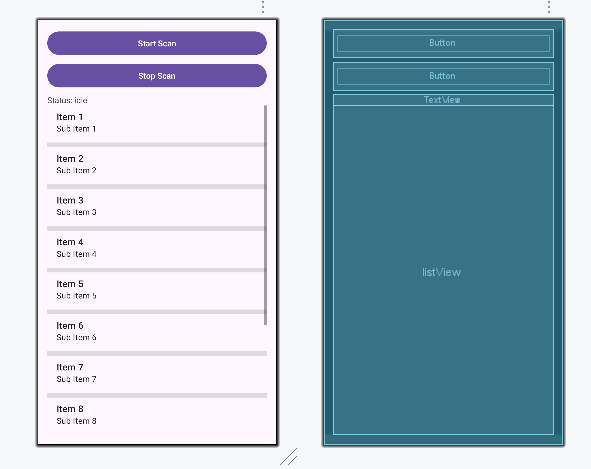
次の画面レイアウトを使用します。
BLEモジュールのスキャンプログラムの実行
作成したスキャンプログラムを携帯にダウンロードして実行すると、次のような内容が画面に表示されます。